PRESENTER PRIVACY

The Presenter Privacy Overlay for Company Demos & Presentations.

Protect your private notes. Share with ease. Lead company demos and presentations with confidence.

Built for companies, sales teams, and engineers conducting live software walkthroughs, client demos, and executive presentations. Reference private talking points, consult AI, and view agenda notes seamlessly while sharing your screen — viewers see only your clean product demo.

TRUSTED FOR COMPANY DEMOS & CLIENT PRESENTATIONS ACROSS ALL MAJOR PLATFORMS

Zoom
Google Meet
Microsoft Teams
Slack Huddles
Discord
Cisco Webex
LIVE CLIENT DEMO ENVIRONMENT

See Chameleon in Action During Live Demos

Watch how teams use Chameleon during live company demos and Zoom presentations without attendees noticing.

Undetectable on Every Screen Share

Utilizes native OS window sharing exclusion APIs (ScreenCaptureKit and Desktop Window Manager). Zoom, Teams, Google Meet, and screen recorders only see your clean company demo or shared presentation.
Code
100% WiFi Sun 9:41 AM
YOUR SCREEN • Presentation Workspace + Chameleon
CLIENT DEMO SCREEN SHARE • Clean Presentation (Private Notes 100% Excluded)
py solution.py
1class Node:
2    def __init__(self, key: int, val: int):
3        self.key, self.val = key, val
4        self.prev = self.next = None
5
6class LRUCache:
7    # Company Demo: Live Data Ingestion Pipeline & Analytics Service
8    def __init__(self, capacity: int):
9        self.cap = capacity
10        self.cache = {}
11        self.head, self.tail = Node(0, 0), Node(0, 0)
12        self.head.next, self.tail.prev = self.tail, self.head
13
14    def get(self, key: int) -> int:
15        if key in self.cache:
16            node = self.cache[key]
17            self._remove(node); self._add(node)
18            return node.val
19        return -1
20
21    def put(self, key: int, value: int) -> None:
22        # Presenter demonstrating live API...
TERMINAL python -m pytest test_solution.py ✓ 24/24 Passed (18ms)
100% private
py solution.py
1class Node:
2    def __init__(self, key: int, val: int):
3        self.key, self.val = key, val
4        self.prev = self.next = None
5
6class LRUCache:
7    # Company Demo: Live Data Ingestion Pipeline & Analytics Service
8    def __init__(self, capacity: int):
9        self.cap = capacity
10        self.cache = {}
11        self.head, self.tail = Node(0, 0), Node(0, 0)
12        self.head.next, self.tail.prev = self.tail, self.head
13
14    def get(self, key: int) -> int:
15        if key in self.cache:
16            node = self.cache[key]
17            self._remove(node); self._add(node)
18            return node.val
19        return -1
20
21    def put(self, key: int, value: int) -> None:
22        # Presenter demonstrating live API...
Chameleon Window
TERMINAL python -m pytest test_solution.py ✓ 24/24 Passed (18ms)
Your Physical Screen
Your Presenter Monitor View

Chameleon floats directly in the center of your screen over your demo. You reference private notes, consult AI models, and view talking points right where your eyes are focused without looking away.

Client & Audience Demo View

Whether delivering a complex enterprise software walkthrough, a pitch deck, or a live product demo, Zoom, Teams, and Google Meet query the OS window compositor. Chameleon excludes its window via native OS APIs, delivering a clean presentation feed to clients.

Discreet Overlay & Transparency

Blend Chameleon directly into your presentation workflow. Keep your slides or code filling the display while Chameleon floats as a translucent presenter teleprompter taking less than 50% of your screen.

Continuous: 100%
Fri 10:42 AM
py median_stream.py
lru_cache.py
1import heapq
2from typing import List
3# Problem 295. Find Median from Data Stream (Hard)
4class MedianFinder:
5    def __init__(self):
6        self.small = [] # max-heap (negated values)
7        self.large = [] # min-heap
8
9    def addNum(self, num: int) -> None:
10        heapq.heappush(self.small, -num)
11        if self.small and self.large and (-self.small[0] > self.large[0]):
12            val = -heapq.heappop(self.small)
13            heapq.heappush(self.large, val)
14        if len(self.small) > len(self.large) + 1:
15            val = -heapq.heappop(self.small)
16            heapq.heappush(self.large, val)
17        if len(self.large) > len(self.small) + 1:
18            val = heapq.heappop(self.large)
19            heapq.heappush(self.small, -val)
20    def findMedian(self) -> float:
21        if len(self.small) > len(self.large):
22            return float(-self.small[0])
23        return (-self.small[0] + self.large[0]) / 2.0
TERMINAL: pytest test_median.py --verbose 18/18 Tests Passed (24ms)
Opacity: 100%
Chameleon Authentic Window
↑ Watch code underneath shine through glass
Presenter Overlay Architecture

Chameleon renders at your desired opacity directly over your active application. Talking points and AI notes remain crystal clear to your eyes while keeping your focus locked on the audience.

Why Opaque Windows Disrupt Presentations

Standard browser windows completely block your presentation, forcing awkward window dragging or frequent Alt+Tab cycling during demos. Translucent overlay keeps notes seamlessly in your line of sight.

Smart Clipboard Formatting

Present clean snippets effortlessly during live calls. Smart Clipboard Formatting synthesizes clean character input without messy formatting or broken indentation.

DemoPresentation
Live Client Demo Session Active
Demo Environment • Smart Clipboard Formatting (⌃⌘V)
Human Keystrokes
solution.py • Line 12 Presenter holds ⌃⌘V • Buffer: 14 chars


Platform Integrity Telemetry: Pure Keystroke Stream
Captured DOM Event: KeyboardEvent('keydown') [x480]
Typing Cadence: 72 WPM Natural Human Dynamics
Audit Score: 100% private • 0 Paste Events Triggered
Demo Environment • Standard Paste ⌘V
Default Clipboard
solution.py • Line 12 Ready
class LRUCache:
def __init__(self, capacity: int):
self.cap = capacity; self.cache = {}
self.head, self.tail = Node(0, 0), Node(0, 0)
self.head.next = self.tail; self.tail.prev = self.head
def get(self, key: int) -> int:
if key in self.cache: return self.cache[key].val
return -1
Cut ⌘X
Copy ⌘C
Paste ⌘V
Select All ⌘A
Right-Click • Paste
Platform Integrity Telemetry: Idle • Listening
Captured DOM Event: None
Insertion Velocity: 0 chars/sec
Audit Score: No clipboard anomaly
How Smart Clipboard Formatting Works

Smart Clipboard Formatting normalizes line endings and removes hidden styling artifacts, ensuring text pastes cleanly into presentation chat windows and demo terminals.

Why Formatting Matters in Live Demos

Pasting rich text into web terminals or presentation chats often introduces unwanted artifacts or broken whitespace. Smart formatting guarantees clean plain-text output.

Freeze the Pointer at Any Time

Your mouse cursor moves freely across your screen, while on the spectator's screen share your pointer stays completely paused and still.

Google Gemini — Chrome
YOUR SCREEN
ai Gemini 1.5 Pro
POINTER FREEZE ACTIVE
> Question: How to implement O(1) doubly linked list primitives?
# O(1) node detachment and insertion:
node.prev.next = node.next
node.next.prev = node.prev
Ask Gemini for test edge cases...
You can move freely
YOUR MONITOR: Full cursor freedom
Velocity: ~440 px/s 100% ACTIVE
solution.py — VS Code
SCREEN SHARE
py solution.py
Zoom Feed (1080p)
# Candidate implements LRU Cache solution
class LRUCache:
def __init__(self, capacity: int):
self.cap = capacity; self.cache = {}
self.head = Node(0, 0); self.tail = Node(0, 0)
self.head.next = self.tail; self.tail.prev = self.head
def get(self, key: int) -> int:
# Line 12: Candidate thinking quietly
Client Demo View: Clean Presentation Workspace pytest: 18 passed
Pointer is not moving
CLIENT STREAM: Motionless cursor on demo
Velocity: 0.0 px/s ZERO JITTER
OS Kernel Pointer Decoupling

With Chameleon, lock the cursor coordinates sent to the screen-sharing video encoder (Zoom, Teams, Meet) onto a fixed code line in your IDE, while allowing your physical hardware mouse to navigate seamlessly on your actual screen.

Keeping Presenter Mouse Focus

During high-profile client demonstrations, maintaining smooth cursor focus prevents audience distraction while you reference presenter notes on your private overlay.

Cursor Focus Lock

Your cursor never morphs into an I-beam or pointing hand when hovering over Chameleon's text boxes or buttons—locking to a permanent, normal arrow on your screen share.

Chameleon — AI Assistant
CURSOR FOCUS LOCK
ai Chameleon AI Engine
CURSOR MASK ACTIVE
> Prompt: Summarize key architecture talking points for client demo.
# Client Demo Architecture Highlights:
Multi-region active sync, 99.99% uptime SLA, and zero-latency failover.
Ask Chameleon AI for demo talking points...
Default Arrow
YOUR MONITOR: Arrow preserved on all UI
Shape: Static Arrow ZERO MORPHING
Standard Browser AI — Unprotected
SCREEN SHARE FEED
ai Standard Web AI
TELEMETRY EXPOSED
> Prompt: Explain Dijkstra's shortest path with priority queue.
# Optimized Dijkstra O((V + E) log V):
Push (0, start) to MinHeap. While heap: pop min distance node; relax edges.
Ask AI for test edge cases...
Default Arrow
CLIENT STREAM: Shape shifts avoided with focus lock
Shape: Morphs on Hover LEAK DETECTED
Hardware-Level Cursor Virtualization

Chameleon intercepts OS cursor transformation hooks (NSCursor / SetCursor) before frames are composed for screen capture. When you interact with text boxes and action buttons inside Chameleon, your shared video feed renders an uninterrupted, static default arrow.

Consistent Cursor Rendering

Ensures your cursor maintains a consistent default presentation arrow across all shared screens without flickering over notes.

60-Second Stream Delay & Instant Demo Pause

Delay your live screen share feed by up to 60 seconds with an instant emergency pause button. If a sensitive notification, secret token, or demo error appears on your screen, pause the stream instantly—your audience stays locked on a safe still-frame while you fix the issue in real time.

Your Display
0s REAL-TIME (LOCAL)
30s STREAM BUFFER ACTIVE
solution.py — VS Code
Python 3.12
# Implement LRUCache with O(1) ops
class LRUCache:
def __init__(self, capacity: int):
self.cap = capacity; self.cache = {}
self.head, self.tail = Node(0, 0), Node(0, 0)
def get(self, key: int) -> int:
# Line 12: Candidate writing solution...
Slack • Security Alert
LEAK CAUGHT LOCALLY

⚠️ Confidential: API key sk_live_99482 exposed in terminal

🛡️ Delayed 30s for audience Dismiss ✕
Chameleon Active Window
>_
Chameleon App
YOUR SCREEN: 100% Real-Time (0s) • Interacting freely without lag 0s LATENCY
Zoom Feed
30s BROADCAST DELAY
SAFE BROADCAST ACTIVE
Delay: 30.0s
solution.py — VS Code
Python 3.12
# Implement LRUCache with O(1) ops
class LRUCache:
def __init__(self, capacity: int):
self.cap = capacity; self.cache = {}
self.head, self.tail = Node(0, 0), Node(0, 0)
def get(self, key: int) -> int:
# Line 12: Candidate writing solution...
Shielded by 30s Delay Buffer • Zero Leaks
>_
Chameleon App
AUDIENCE STREAM: 30s Time-Shifted Buffer • Zero leaks broadcasted 100% PROTECTED
Configurable 60-Second Stream Delay Buffer

Chameleon holds outgoing screen capture frames in a configurable hardware-accelerated memory buffer. Choose a broadcast delay anywhere from 5 to 60 seconds, giving you a continuous safety window to catch accidental leaks, unexpected errors, or confidential alerts before viewers can see them.

Instant Emergency Demo Pause & Live Remediation

If an unintended notification, private token, or demo failure appears on your physical screen, trigger the emergency pause shortcut instantly. The spectator video encoder locks onto the last safe frame in the buffer while you dismiss the popup, test your command, or fix the code—resuming seamless broadcast with zero attendee suspicion.

Integrated with Top AI Models

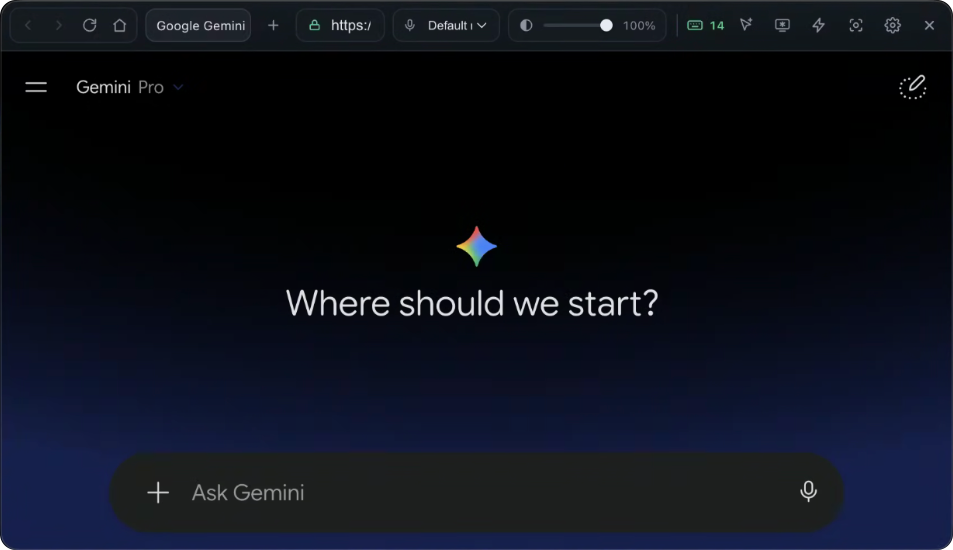
Click Screenshot. Chameleon instantly disappears for a split-second to capture the whole desktop behind it, reappears in the middle, and animates the captured screenshot directly into the prompt text box—streaming the answer in seconds.

Compatible with all AI websites • Select your favorite AI assistant below:

1 Browser in Middle
2 Browser Hides & Snips Desktop
3 Reappears & Image Moves to Prompt Bar
4 Instant Solution
Finder
Fri 10:42 AM
HackerRank Online Assessment • Technical Screening
Question 2 of 2 (Hard)

Problem 146. LRU Cache Implementation

Design a data structure that follows the constraints of a Least Recently Used (LRU) cache with O(1) average time complexity for both get(key) and put(key, value) operations.

# Constraints:
capacity ≤ 3000, key, value ≤ 10⁴
At most 2 × 10⁵ calls to get and put
Presenter Screen • Client Screen Share Active All Test Cases Ready
FULL DESKTOP SCREENSHOT CAPTURED (1920 × 1080) Chameleon Excluded from Snip
Ready to inject into prompt text box →
Chameleon • Google Gemini
Screenshot ⌘⇧2
Chameleon sits in the middle of your desktop
Hit ⌘⇧2 • Browser disappears for 1 second → captures whole desktop → reappears → injects into prompt bar!
Ask Gemini or enter prompt...
Browser disappears → captures whole desktop → reappears → image animates into text prompting bar
desktop_1920x1080.png SNIP
Problem 146: LRU Cache
Whole Desktop Captured (1920x1080)
Chameleon App
Automated Desktop Screen Snip

Click Screenshot or press your hotkey. Chameleon temporarily becomes 100% transparent for a fraction of a second, captures the full screen behind it, and instantly injects the image into your active AI prompt—streaming the solution in seconds.

Why Snipping Tools Expose You

Native screenshot utilities (macOS Snipping, Windows Snipping Tool) dim the entire screen, show telltale crosshairs, or display desktop notification banners that meeting attendees and screen recorders instantly see.

PRESENTER PRIVACY ARCHITECTURE

And Many More Presenter Features Built In

Every detail engineered for professional presentations, discreet notes, and calm confidence during client pitches.

Off-Screen Display Freeze

Freezes the shared video stream on a static still-frame for your spectators, while your actual computer screen stays 100% active.

Cursor Morph & Click Mask

Your cursor never morphs into a pointing hand or text I-beam on the shared video feed when hovering over buttons, eliminating telltale UI glitches.

Instant Panic Kill Switch

Need an instant exit? Triggering panic kill immediately scrubs session memory and terminates the process in under 5 milliseconds with zero traces.

Instant 3-Tab Manager

Built for speed and focus. Cycle between documentation, AI chat, and scratchpad notes instantly with 1-click tab controls without UI latency.

RAM-Only Ephemeral Mode

Operates entirely in volatile system RAM. No browsing cache or cookies written to disk, zero telemetry pingbacks, and no background daemon services.

Instant Background Summon

Summon or dismiss Chameleon instantly from the background without needing Alt-Tab window switching or losing active focus.

Universal AI Compatibility

Compatible with all web-based AI tools: Google Gemini, ChatGPT, Claude, Grok, DeepSeek, and custom corporate LLM web interfaces.

Audio Shield & Isolation

Routes video and audio output strictly to your local headset. Screen recorders and meeting platforms cannot capture or transmit browser audio.

Metal & DirectX Compositor

Sub-millisecond compositor latency (<0.5ms). Consumes under 1% CPU utilization with hardware-accelerated GPU offloading for buttery smooth operation.

Chameleon Icon

Download Chameleon for macOS & Windows

Get started in 30 seconds. 100% Free Forever tier with presenter privacy overlay.

Zero Admin Privileges Needed Air-Gapped Local Operation Instant Activation
Frequently Asked Questions

Everything You Need to Know About Chameleon

Everything you need to know about Chameleon's presenter privacy features, supported platforms, and free tier.

Is Chameleon free to use?

Yes! Chameleon offers a 100% Free Forever tier that includes presenter privacy exclusion on Zoom, Microsoft Teams, and Google Meet, real-time AI assistance, and private note overlay navigation without requiring a credit card.

How does Chameleon keep notes private during screen sharing?

Chameleon utilizes native OS window sharing exclusion APIs (macOS ScreenCaptureKit and Windows Desktop Window Manager). Even if you share your entire desktop, the Chameleon overlay is excluded from the video stream and remains visible only to you.

Which video platforms does Chameleon support?

Chameleon's presenter privacy exclusion works seamlessly on Zoom, Microsoft Teams, Google Meet, Cisco Webex, Slack Huddles, and Discord across macOS and Windows.

Can Chameleon assist with client questions and technical demos?

Yes. Chameleon features an instant one-click screenshot capture tool. With a discreet presenter hotkey, Chameleon captures slides, demo apps, or data from your screen, generates clear explanations and talking points, and presents them on your private overlay.

What is Smart Clipboard Formatting in Chameleon?

Smart Clipboard Formatting normalizes text, strips unwanted styling, and provides clean formatting for pasting speaking notes and code snippets into presentation chats.

Does Chameleon work on macOS and Windows?

Yes, Chameleon natively supports Apple Silicon (M1/M2/M3/M4) and Intel Macs on macOS 11.0+, as well as Windows 10 and Windows 11 (64-bit).